Work / App · Tool
Unreason
Open
- UnreasonThe whole app in one page. Open an example, press Space, and change anything.Run
About
Why a rack
Most music software hides the signal path behind menus. A rack shows it. Every device has its controls on the front and its inputs and outputs beside them, and nothing reaches another device unless a cable takes it there. That makes it a good place to learn how sound is built, and a good place to make things that a fixed layout would not allow: a sequencer that plays a bass and a drum at once, an LFO restarted on every step, a knob that is also a cable.
Small on purpose
Unreason is built to stay light and easy to extend. A device is one folder: a list of its params and jacks, the code that makes its sound, and, if it needs one, its own panel. The rack builds its controls from that list, so adding a device means writing its sound, not its interface. Each device weighs a few kilobytes, and the whole app, examples included, fits in one HTML file that works opened straight from disk.
Features
- 01
A rack, patched by hand
Instruments, effects, a mixer and control devices stacked in a rack. Drag a cable from any output to any input. Audio goes to audio; control and gate signals go anywhere, with a trim on each cable.
- 02
Control signals everywhere
A step sequencer sends note, gate and a curve. An LFO moves a filter or a pan. The drum machine's step pulse restarts an LFO. Loops are allowed and behave like feedback on hardware.
- 03
Instruments and effects
A subtractive synth, a 4-operator FM synth, an 8-bit chip synth, two drum machines (one with the Berlin kick and its rumble), a sampler and a loop slicer. Echo, reverb, drive, bitcrusher, a compressor with a sidechain input, EQ, chorus, phaser, and beat effects (stutter, tape stop, trance gate) in time with the song.
- 04
Live code, FoxDot style
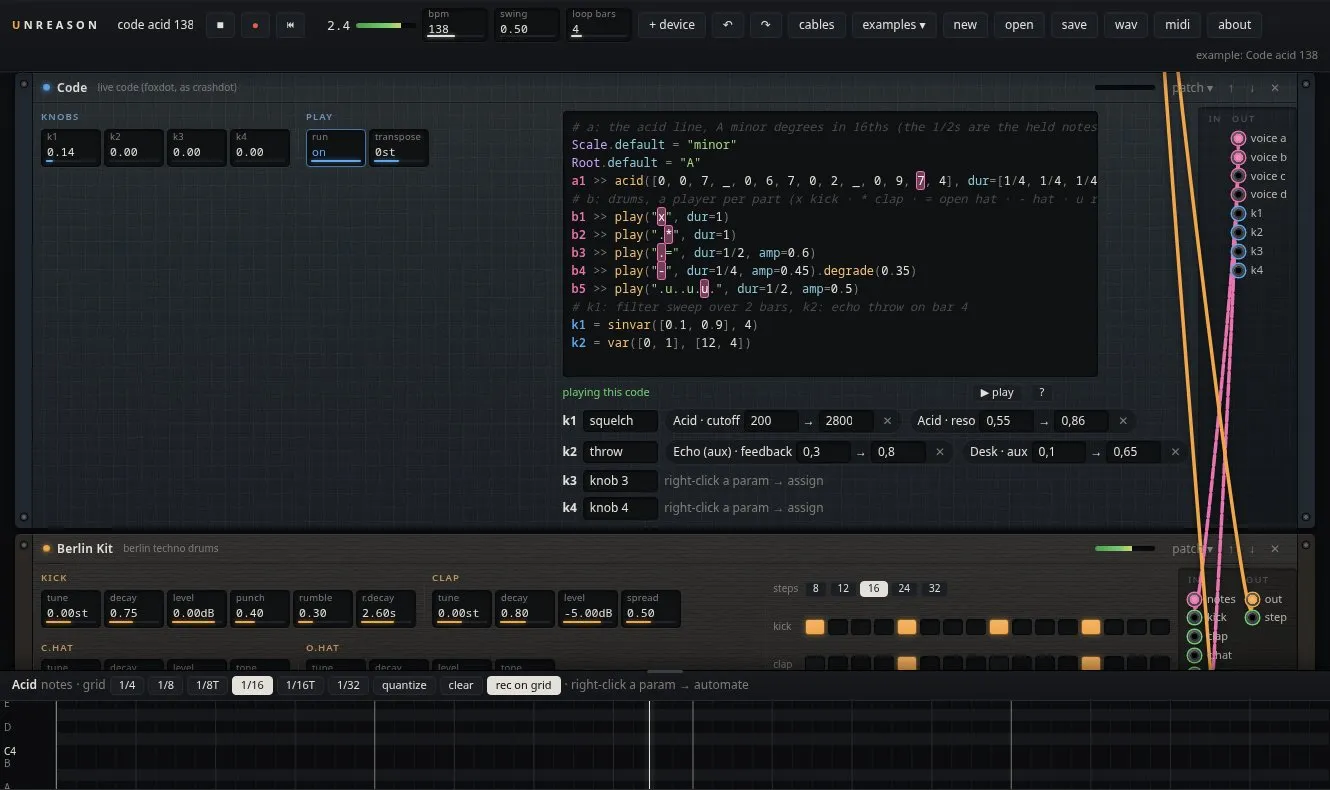
The Code device runs crashDot's FoxDot language inside the audio engine. Players send notes down note cables into any instrument, play("x-o-") drives the drum machines, and linvar or sinvar turn knobs mapped to any param.
- 05
Notes on cables
A note cable carries whole notes and chords from one device to another. An arpeggiator, a chord player that knows the key, and a scale quantizer sit between the code or the keys and the synths.
- 06
Macro knobs
One knob turns several params on other devices at once, each over its own range, and is also a control output to patch.
- 07
Notes and automation
A piano roll for each instrument, and an automation lane for any param of any device. Draw points, or arm recording and play the keys or move the params while the loop runs.
- 08
Examples with nothing hidden
Acid, dub chords, a break, Berlin techno with sidechain, live-coded acid, chord arpeggios, a chip tune, a sliced break, a generative patch with no notes. Each is made only of ordinary devices, cables, notes, lanes and macro settings, so every part can be changed.
- 09
Patches and MIDI
Factory and saved patches per device, randomise, duplicate. Play from a MIDI keyboard, and map any param to a controller with MIDI learn.
- 10
The same engine renders
One audio worklet runs the whole rack, sample-accurate. WAV export runs that same graph offline, so the file sounds like what you heard.
Credits
- Design, DSP, code — SVDK